
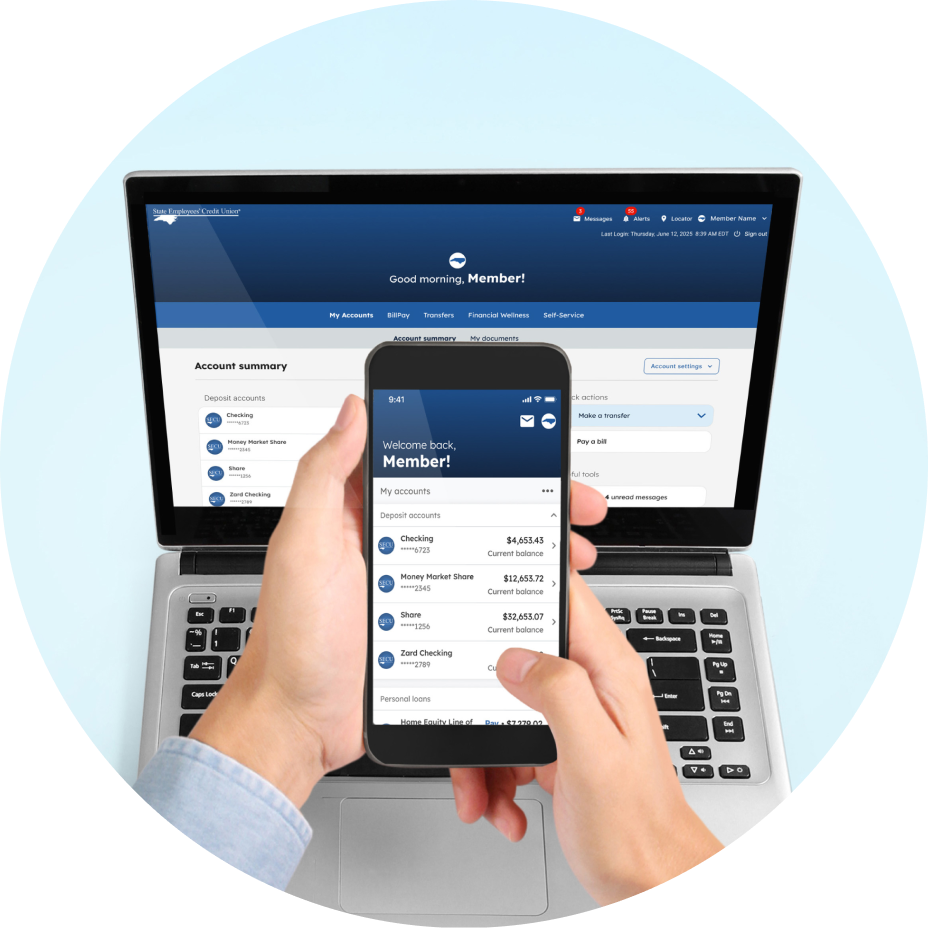



New Member Access on cell phone and computer

The New Member Access is Here

Experience a more secure, convenient, and intuitive way to manage your accounts. Discover how Member Access is improving to serve you better, and find answers to common questions about the update.

A connected experience across any device

At SECU, members shape what we do. Your feedback is the driving force behind the new enhancements. Whether you use the mobile app or the online experience, you have the same Member Access tools and features at your fingertips.

move money icon

Expanded money movement options

Moving money is more flexible than ever with an updated BillPay experience and the ability to instantly1 send funds to other SECU members with Member-to-Member transfers.

360 degress money

A 360-degree financial picture

Safely link external accounts to see your finances in one place. Use new budgeting tools to track your spending, and receive custom alerts to stay on top of your account activity and savings goals.

bank icon large with blue circle

Support across every channel

With 275 branches, 1,100 ATMs, 24/7 Member Services Support, and convenient digital access on all your devices, support is always available whenever and wherever you need it.

Features at a glance

Watch our quick video guides to explore the new features and see where to find them.

Member-to-Member Transfers


Quick & Recurring Transfers

How to get started

Sign in to accept the new terms, update your alerts, and verify your scheduled BillPay payments.

Vector of man with paper and checkmark

Review and accept the new terms of service


To access the new platform, you’ll be prompted to review and accept the updated Online Services Agreement and E-Sign Agreement during your first sign-in.


See what's new in the updated Online Services Agreement:
 

Vector of person with computer and  lock icon

Your first sign in

 
  • Returning members: Use your current Member Access username and password.
  • Mobile App users: You will be prompted to update the SECU App before signing in with your current Member Access username and password.
  • New to Member Access? Have your deposit account or debit card number ready to enroll.
  • Enhanced security: All members are required to set up multi-factor authentication (MFA). MFA replaces security questions with one time passcodes to verify your identity.

View the security & sign-in FAQs

Vector of woman with card and phone to pay a bill

A smarter way to pay your bills

Our new delivery-based system changes how you schedule payments. Instead of selecting when to send money, you now choose when it arrives.

  • Action required: Your previously scheduled payments have transitioned to the new platform’s “deliver by” model, with the exception of check payments, payments made from Health Savings Accounts (HSA), payments made to other SECU deposit accounts, and duplicate payments. Once signed in, review your payment dates and ensure they align with your needs.
  • Electronic payments: Funds will be withdrawn from your account 1 business day before your chosen delivery date.
  • Check payments: Funds will be withdrawn 5 business days before the estimated delivery date.

View the BillPay FAQs

Vector of man with phone and notifications

Stay in the loop with personalized alerts


Choose how and when you want to be notified—via text, email, push notification, or Alerts inbox—for low balance warnings, payment reminders, and more.
 

  • New alert options: Receive up to 40 different alert types, including required, optional, and custom notifications. These alerts will replace our Two-Way Text Messaging service.
  • Action required: For your security, current alert settings did not carry over. You will need to re-enroll after your first sign-in to continue receiving alerts, including Another Chance Alerts.

Security & sign-in

At the Member Access sign-in screen, select “Forgot password” and follow the prompts to update your password. To reset your username, you must contact Member Services Support at (888) 732-8562.

To ensure your information stays secure and the mobile app runs smoothly, we recommend using the most recent version of your phone's operating system.
The SECU App supports:

  • Apple (iOS): 17, 18, 26
  • Android: 11, 12, 13, 14, 15, 16

Availability may vary as Play Store updates roll out across devices. If your device no longer receives software updates from Apple or Google, you may experience issues. For the best experience, keep your device's software up to date. If your device’s operating system is not compatible, please sign in to Member Access using your device's mobile web browser or a personal computer.

To keep your data secure and ensure the best performance, we recommend using the latest version of Microsoft Edge or Chrome. Using an outdated browser may limit certain features.

You can keep using your previous username and password. For enhanced security, your first sign-in on the new platform requires a multi-factor authentication (MFA) setup using your phone number.

In the new Member Access platform, members have one username to access all of their accounts online. For any members who had multiple active digital profiles, their most frequently used username and password were the set of credentials migrated to the new platform.


Members with fiduciary account ownership can see all accounts combined into one Member Access profile (the most frequently used). You no longer need to maintain multiple credentials to manage different account types.

You will sign in the same as you did previously, through ncsecu.org or the SECU Mobile App.

BillPay, transfers, & cards

The new BillPay system delivers a seamless, modern experience with enhanced features and an expanded network of electronic billers. Funds are now verified and withdrawn before the payment is sent, making it easier to keep track of your account balance and helping you avoid returned checks. With a delivery-based payment system, payments are scheduled based on when the biller will receive them to help ensure your bills are paid on time.

Previously scheduled payments moved to the new platform with the exception of check payments, payments made from a Health Savings Account (HSA), payments made to other SECU deposit accounts, and duplicate payments. If multiple payments to the same biller have the same date and amount, only one migrated. We recommend signing in to confirm your payment dates.

Your scheduled payments have automatically transitioned from “Send dates” to “Deliver by/estimated delivery dates.” To ensure on-time delivery, funds are withdrawn 1 business day before the “Deliver by” date for electronic payments and 5 business days before the “Estimated delivery date” for paper checks. Ensure your account has sufficient funds on the specified withdrawal date.

Just like a debit card purchase, funds must be available on the day funds are withdrawn for electronic and check payments. If sufficient funds are not available, the payment may fail or be subject to standard overdraft transfer practices, depending on your account settings. Note: Unlike the previous system, the new BillPay platform will not make multiple attempts to process a failed payment.

Yes. BillPay payment details show the date the funds were withdrawn, the estimated delivery date, and the date the check is cashed.

No, your account and card numbers remain the same.

Frequently asked questions about Member Access

Our completely redesigned platform gives you more features and tools to manage your SECU accounts from any device. This update brings your online access and mobile app into one seamless experience. 

Yes. This update applies to both your online Member Access experience and the SECU Mobile App. Update your app in the App Store or Google Play Store and sign in with your Member Access username and password.

No. Technology can improve convenience, but personal service through our statewide branches, ATMs, and our Member Services Support help line will always be available to you.

Now that the new platform has launched, the old version of Member Access is no longer available.

You may contact Member Services Support, our 24/7 member helpline, at (888) 732-8562 for assistance.


To ensure the highest level of security, previous alert settings cannot be automatically transferred. Re-enrolling ensures you will continue receiving important notifications, such as Another Chance Alerts to help you stay on top of your Checking Account balance. It also gives you the opportunity to explore and customize the expanded alert options now available.